Code-first CI/CD
Pipeline logic belongs in your repo, not in a YAML string.
Forge is a container-native CI/CD system where steps can be generated at runtime by real scripts — Python, Go, Node, whatever you already write. Your CI logic gets syntax highlighting, tests, and readable diffs like the rest of your code.
Everywhere else
Run your first pipeline Browse example pipelines
Start where you are
-
Run a pipeline in five minutes
Clone, build, and execute a pipeline against your local Docker daemon. No scheduler, no database, no account.
-
Write your first pipeline
Every step field, step type, and expression, with a worked example at the end.
-
Stand up a shared instance
Scheduler, agents, Postgres, Vault, and S3 storage — plus TLS, roles, and autoscaling.
-
Enforce standards across repos
Inject security scans into every pipeline from one place, and scope secrets per project, org, or globally.
What Forge does differently
Steps generated at runtime
A generator step runs your code and emits new step definitions as JSON. Build for
every platform listed in platforms.json? Write a script that reads it. Add a
platform, and the pipeline adapts on the next run — no YAML change.
Testing CI logic covers the generator protocol and how to preview generated steps without submitting a run.
Pipelines that call other pipelines
A type: pipeline step triggers another pipeline, hands artifacts to it, and
waits for the result. Deploy logic lives in one file and is called from
everywhere.
- id: deploy-staging
  type: pipeline
  pipeline: .forge/deploy.yml
  wait: true
  variables:
    ENVIRONMENT: staging
  artifacts_send: [build-output]
  artifacts_receive: [deployed-endpoint]
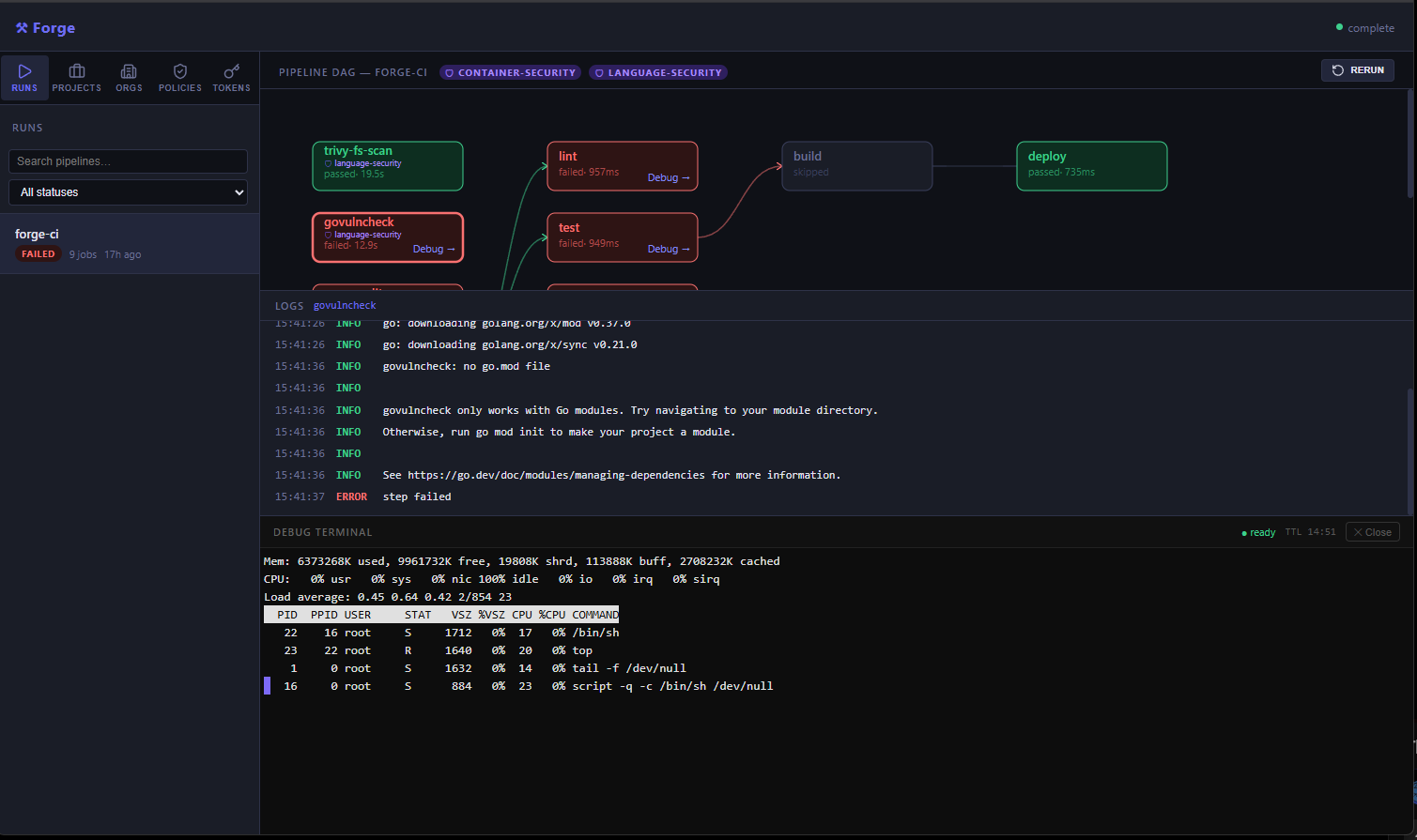
A real terminal in the failed container
When a step fails, open a shell in that container, in the environment it failed
in. cd into the workspace and look, instead of re-running with more echo
lines.
Policies injected at submit time
Define Trivy scans, govulncheck, or anything else once at the org level. The
scheduler injects them into every pipeline at submit time — pipeline authors
don't have to know they exist, and changing the policy changes every repo.
Test splitting from real timings
Forge records per-file runtimes from the test reports your steps already emit and rebalances shards on every run, so parallel shards finish together.
How the pieces fit
graph TD
    subgraph IG ["Ingress"]
        CLI[forge CLI]
        UI[Web UI]
        SCM[GitHub/GitLab]
    end

    Scheduler["Scheduler (:8080)"]

    subgraph INF ["Infrastructure"]
        DB[(PostgreSQL)]
        Vault[Vault]
        S3[MinIO/S3]
    end

    subgraph WK ["Workers"]
        Agent1["Agent 1"]
        Agent2["Agent 2"]
    end

    IG --> Scheduler
    Scheduler --> INF

    Agent1 -- "Polls" --> Scheduler
    Agent2 -- "Polls" --> Scheduler

    Agent1 -- "Logs/Status" --> Scheduler
    Agent2 -- "Logs/Status" --> Scheduler

    Agent1 -- "Secrets" --> Vault
    Agent2 -- "Secrets" --> Vault

    Agent1 -- "Artifacts" --> S3
    Agent2 -- "Artifacts" --> S3
The scheduler accepts submissions, applies org policies, stores jobs in PostgreSQL, and serves the Web UI. Agents lease jobs, run them in Docker containers, stream logs back, and move artifacts to S3-compatible storage. All traffic, including debug terminals, is routed through the scheduler, so agents never need an exposed port.